HireVue is best known for recorded video interviews, but it also runs coding challenges through a tool called CodeVue. HireVue lets employers combine the two, so a "HireVue coding assessment" can mean a coding round on its own or one inside a video interview. This guide covers what HireVue itself tells candidates, plus what HireVue advises employers, which tells you a lot about what you'll face. For the video side, see our guide to HireVue interview questions.
What is the HireVue coding assessment?
It is one or more programming challenges you complete in HireVue's coding editor, on your own schedule before a deadline. HireVue says it has more than 200 ready-made coding assessments, and employers can also write their own. Languages named on HireVue's product page include Python, Java, Ruby, JavaScript, PHP, C++ and Perl, among others.
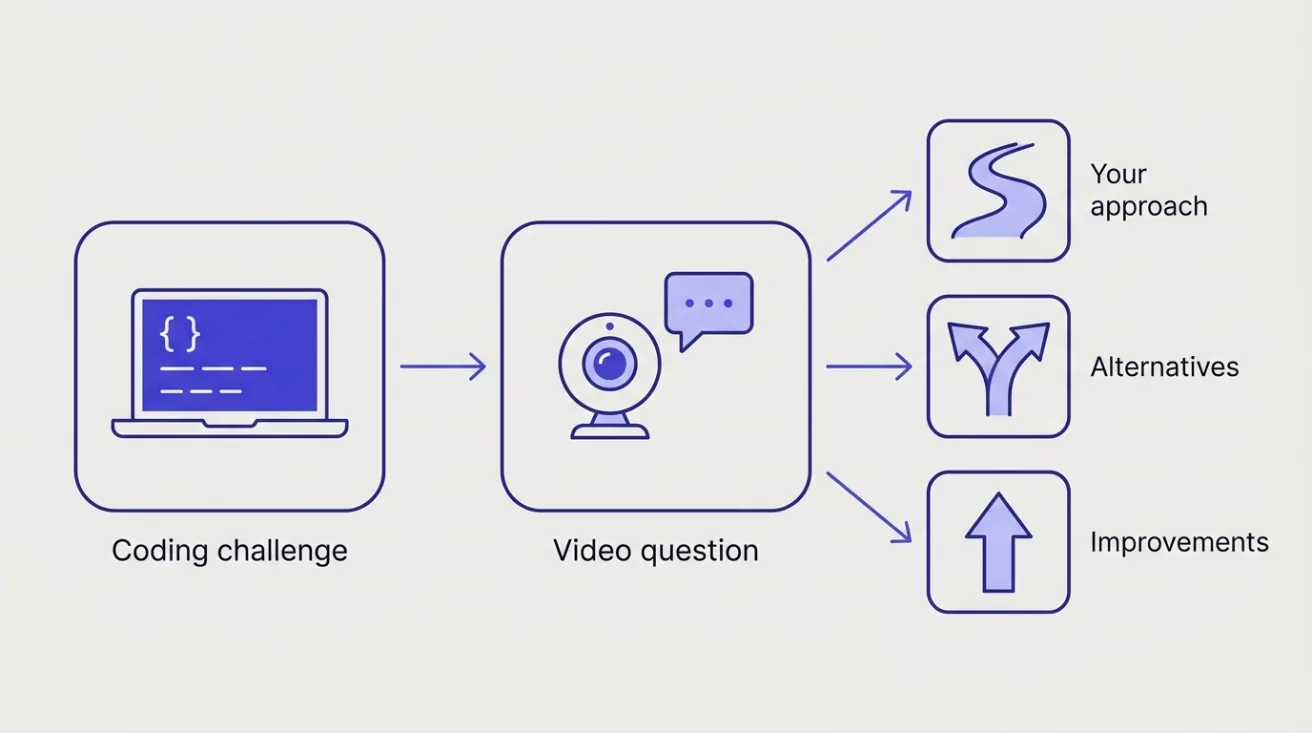
HireVue pitches coding challenges and interviews to employers as "one seamless experience", and advises them to follow each challenge with a video or live interview question, so your coding round may include recorded video questions as well.
How many questions are on a HireVue coding assessment?
The employer decides. HireVue's published guidance to employers suggests:
- Two or three challenges for technical hires, taking a candidate 20 to 30 minutes.
- Two to four easy challenges for campus and graduate hires.
- One or two challenges for experienced and senior roles.
- A time limit on each challenge, generous enough that it isn't a race. HireVue notes the limit also signals how much effort a solution should take.
If your invitation mentions a coding challenge and a video interview, budget time for both. For video-based assessments, HireVue's candidate FAQ says most have five to eight questions and suggests setting aside 45 minutes.
Cohesyve
Get used to being assessed before you sit a HireVue coding assessment
Cohesyve's practice runs are AI job simulations of the role you want, not copies of a HireVue coding assessment. They show where you lost marks. 3 free practice assessments, no card.
Which language will I code in?
The employer chooses. After the Begin page, CodeVue either shows you a drop-down of the languages allowed for the challenge or tells you which one to use. If you have a choice, pick the language you write fastest and most accurately in.
What will the challenge look like?
HireVue doesn't publish its challenges, and every employer's set is different. Here is our own illustration of the size and style of a short, timed challenge. It is not a HireVue question.
Our example: Given a list of order timestamps in the form "2026-10-21 14:32", return the hour of the day with the most orders. If two hours tie, return the earlier one.
A strong answer reads the input carefully, counts orders per hour in a single pass, handles the tie rule and an empty list, and is easy to read. That last point matters more than usual here, because HireVue advises employers to follow each challenge with a video or live interview question about your solution.
The video follow-up
HireVue recommends that employers add a video question after each coding challenge, or a live interview question, asking you to explain how you reached your solution, what alternatives you considered and how you'd improve it.
So prepare to talk about your code as well as write it. After each challenge, note in a sentence or two what approach you took, its trade-offs, and what you'd change with more time. That gives you an answer ready if the next screen asks.
The rules: search and AI tools
HireVue tells employers to state whether internet searches are allowed and which kinds, such as looking up a method name. Searching for a solution counts as cheating. HireVue also detects potentially plagiarised submissions automatically.
Read the instructions on your invitation and the start screen. If they don't say whether you may search or use AI tools, assume you may not, and ask the employer if it matters.
Before you start
From HireVue's candidate help centre:
- Use a computer. CodeVue works on macOS 10.12 or later and Windows 7 or 10 and later. It isn't supported on mobile devices.
- Check the deadline. Your invitation email shows your due date, if you have one. If it doesn't, HireVue's CodeVue FAQ recommends finishing within 48 hours of receiving the invitation, or as soon as possible.
- Use the practice round. After clicking Begin, you can choose Practice or Start Challenge. Practise first to learn the editor.
- Don't let the link expire. If the deadline passes, the link stops working, and HireVue's support team can't extend it or reset your interview. Only the employer can.
- Your questions are fixed. HireVue says every candidate for the same role gets the same questions and the same time, and you can't see them in advance.
Can I retake a HireVue coding assessment?
Only if the employer agrees. HireVue's CodeVue FAQ says retakes are decided by the company you applied to, so contact them directly.
How to prepare
Practise timed, small problems. HireVue's guidance to employers points to a few short challenges, each with its own time limit. Work to a timer so you learn how far you get in 20 to 30 minutes.
Write for the edge cases. Empty input, a single item, ties, duplicates and very large values. Handle them explicitly.
Read the whole prompt before typing. Output formats and tie-break rules, like the one in our example above, are the details easiest to miss when you rush.
Practise explaining out loud. Solve a problem, then record yourself explaining it in two minutes: the approach, the complexity and one improvement. That is the video follow-up in miniature.
Know your language's standard library. In an unfamiliar editor, knowing the right method names by heart saves time.
Where Cohesyve fits
Coding challenges check you can write correct code under time pressure. Teams then look at how you handle work closer to the job: reading code you didn't write, debugging, explaining a decision. Cohesyve, which publishes this guide, runs practice job simulations for that stage, for roles such as backend developer, frontend developer and full-stack developer, with a report on where you lost marks. It isn't a HireVue practice test. For other coding platforms, see our guides to HackerRank and the CodeSignal General Coding Assessment.
Sources
Checked 21 October 2026.