Coderbyte is a platform companies use to build technical assessments and run coding interviews. Like other platforms of its kind, it doesn't give one standard test: each employer picks the challenges, the time limit and the rules. What stays the same is the candidate experience and how challenges are scored, and Coderbyte documents both. This guide covers them.
What's in a Coderbyte assessment?
Depending on what the employer chose, you may see:
- Coding challenges. Algorithm problems, and front-end, back-end and SQL tasks.
- Spreadsheet challenges.
- Free-form questions, where you write an answer or explain your work.
- Multiple-choice and short-answer questions.
Coderbyte says its library has more than 1,000 challenges in over 30 languages, from Python, Java and JavaScript to Go, Rust and SQL dialects. Employers can also write their own.
How the timer works
The welcome screen shows the total time for the assessment. The timer starts when you click Begin Assessment, and all the questions appear. You cannot pause it, so start only when you have the full time free.
Coderbyte notes the time limit is separate from the link's expiry date: the link may stay open for a while, but once you begin, the clock runs.
Cohesyve
Get used to being assessed before you sit a Coderbyte assessment
Cohesyve's practice runs are AI job simulations of the role you want, not copies of a Coderbyte assessment. They show where you lost marks. 3 free practice assessments, no card.
How Coderbyte scores coding challenges
Coderbyte explains its scoring in its help centre:
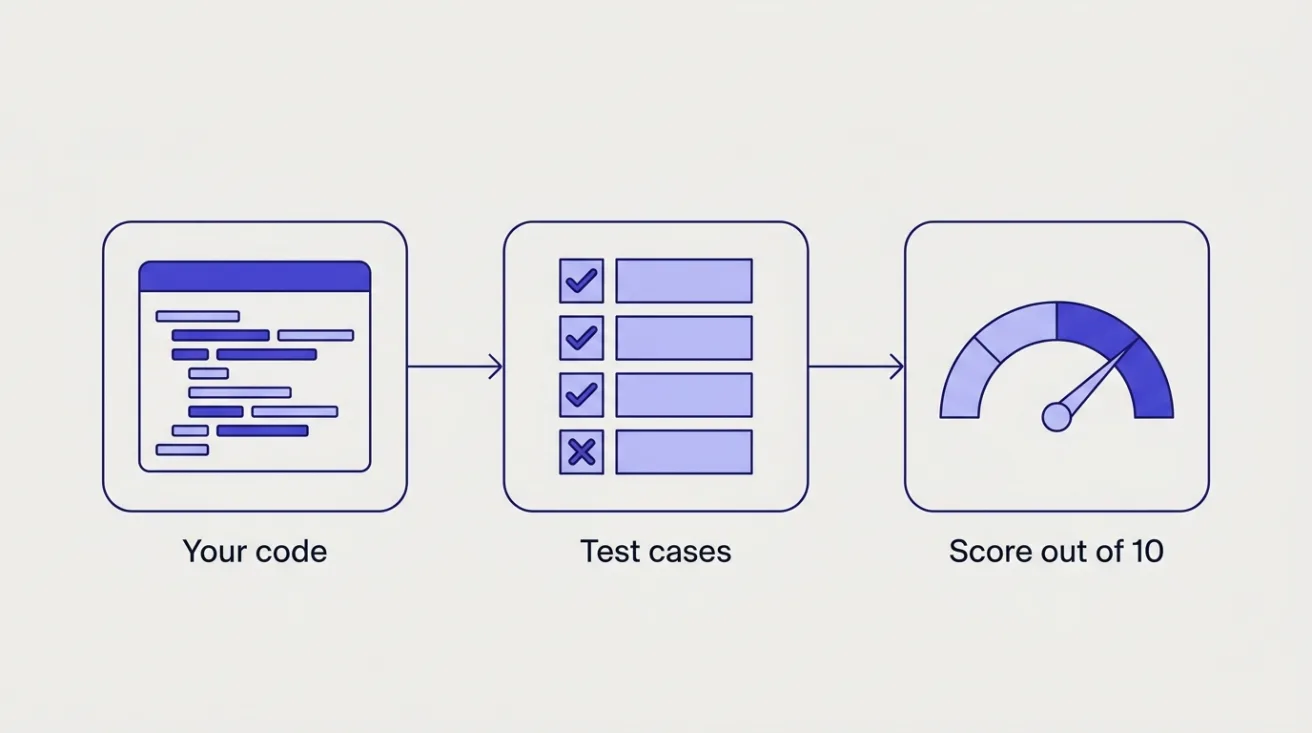
- Test cases decide the score. Each challenge has test cases that check whether your code produces the correct output. Each passed case earns between half a point and a point.
- The scale is 1 to 10. Algorithm, front-end, back-end and SQL/GraphQL/MongoDB challenges are scored out of 10.
- Partial credit counts. Because points come from individual test cases, a solution that handles most cases is worth far more than nothing.
- Speed points are gone. Coderbyte used to award extra points for finishing fast; it says that feature is no longer available.
Coderbyte says free-form answers can also be graded by AI.
The rules in the editor
From Coderbyte's candidate guide:
- The left panel shows the task and any sample test cases. Read both before you write anything.
- Click Submit to grade a solution. If the employer allows it, you'll see your result straight away; otherwise you'll see a message that your code was saved.
- Don't change the function call at the bottom of the editor in algorithm challenges.
- Write your code in the editor. Pasting code from outside the editor and leaving the tab while coding are both flagged as possible cheating.
- Search, if offered. Some employers enable a Google search box inside the editor so you can look things up without leaving the page.
- Webcam, if required. When webcam proctoring is on, you're asked to turn on your camera before you start.
- AI, only if enabled. Some employers set take-home projects with an AI assistant switched on. Coderbyte says those are graded partly on how you prompted, what you accepted or rejected, and how you explain your work in a README.
If the employer's instructions don't mention a tool and the editor doesn't offer it, assume it isn't allowed.
What will a challenge look like?
Each employer picks its own mix of challenges, and some write their own, so no guide can tell you which ones you'll get. Coderbyte's public practice site includes a Bracket Matcher challenge. The example below is our own version of that classic problem, not Coderbyte's wording.
Our example: Write a function that takes a string of brackets, such as "([]){}", and returns true if every bracket is closed in the right order, and false otherwise.
The sample might show one balanced string. Assume the samples aren't the whole set, and check the cases they leave out: an empty string, a single bracket, a string that opens without closing, and one that closes too early. A stack-based solution handles them all.
Can I redo a challenge or retake the assessment?
Only if the employer allows it. Coderbyte's help centre says employers can switch on a setting that lets you redo a coding challenge and change your code after submitting, and recommends leaving it off unless the challenges are very hard. Coderbyte doesn't document retaking a whole assessment, and your invite link often works only once. If something went wrong, contact the employer.
How to prepare
Learn the editor first. Coderbyte's main site lists practice challenges, such as Longest Word and Tree Constructor. Try a few before a real test, so the way input is read and output returned is familiar.
Write for test cases you can't see. Before submitting, check empty input, one item, duplicates, negative numbers and very large values.
Get a working solution, then improve it. Since marks come per test case, get a correct simple version running in the editor first, then extend it to the cases it misses. Click Submit when you've finished that challenge, or before time runs out: unless the employer has switched on redos, you can't change your code after submitting.
Keep your code in the editor. Draft and test it there, since pasting from elsewhere gets flagged.
Practise the question types you'll get. If the role is front-end, practise a small UI task as well as algorithms. If the invitation mentions spreadsheets or SQL, practise those.
Disable your ad-blocker. Coderbyte asks candidates to turn ad-blocking extensions off so the page works properly.
Where Cohesyve fits
Coding challenges check correctness under time pressure. Teams then look at how you handle work closer to the job: debugging, reviewing a change, explaining a decision. Cohesyve, which publishes this guide, runs practice job simulations for that stage, for roles such as backend developer, frontend developer and data engineer, with a report on where you lost marks. It isn't a Coderbyte practice test. For other platforms, see our guides to Codility, HackerRank and the CodeSignal GCA.
Sources
Checked 21 October 2026.
- Coderbyte: candidate guide to taking an assessment
- Coderbyte: candidate guide
- Coderbyte: practice challenges
- Coderbyte help: scoring for code challenges
- Coderbyte help: candidates viewing their results and redoing challenges
- Coderbyte help: time limits
- Coderbyte help: webcam proctoring
- Coderbyte help: testing for AI fluency
- Coderbyte help: languages and technologies