Much of sourcing is repetitive: building searches, reading profiles, writing first messages and sending follow-ups. Software now does these steps reasonably well, which is why so many hiring products, from sourcing databases to applicant tracking systems, now offer sourcing and outreach automation.
This guide sorts the products by what they actually do, suggests what to automate first, covers the deliverability and consent basics that decide whether outreach works at all, and lists the metrics worth tracking. Competitors are described by their own public positioning. Cohesyve, which publishes this guide, is one of the end-to-end services in the fourth category.
What is candidate sourcing automation?
Candidate sourcing automation is software that finds people who match a role, often people who have not applied, and helps you contact them, with less manual searching and messaging. At its simplest it is a better search box over a profile database. At its fullest it takes a job description and returns a list of interested, evaluated candidates.
Most products automate some of these steps:
- Turning a job description into a search.
- Searching one or more profile sources, including your own ATS.
- Ranking the results by fit.
- Drafting personalised first messages.
- Sending a sequence of follow-ups across email and other channels.
- Handling replies, booking calls and updating the ATS.
- Evaluating the people who respond.
The four categories of tools
| Category | What it does well | Where it stops | Examples (public positioning) |
|---|---|---|---|
| Sourcing databases | Large searchable profile pools, detailed filters, contact data | Search is the core product; outreach and screening come through their AI agents | LinkedIn Recruiter, SeekOut, hireEZ |
| Outreach sequencers and recruiting CRMs | Multi-step campaigns, personalisation, nurturing past candidates, reporting on replies | Tools without built-in sourcing depend on the quality of the list you feed them | Gem; general-purpose email sequencers |
| ATS add-ons | Sourcing and messaging inside the system recruiters already use | Usually less depth than a specialist | Workable, Ashby |
| End-to-end JD-to-shortlist services | Take a job description and return engaged, evaluated candidates | Less hands-on control of each search and message | AI agent offerings from SeekOut, hireEZ and LinkedIn; Cohesyve |
Sourcing databases
These are the deepest pools of profiles. LinkedIn presents Recruiter as advanced search with dozens of filters plus InMail, now paired with an AI Hiring Assistant that handles sourcing and shortlisting while recruiters keep control. SeekOut describes itself as an agentic AI recruiting platform that can take a job description to a ranked shortlist and draft personalised outreach. hireEZ's EZ Agent searches across many platforms, reaches out, and resurfaces past applicants already in your ATS, with recruiters approving every decision.
Good for: specialist and senior roles where inbound is thin, and teams with recruiters skilled at search.
Outreach sequencers and recruiting CRMs
These tools contact people at scale and keep track of them over time. Gem, for example, combines AI sourcing with a CRM that nurtures talent through automated sequences, plus an ATS and scheduling. Sales-style sequencers can be adapted for recruiting, but usually lack candidate-specific features such as ATS sync and pipeline stages.
Good for: teams that already have plenty of profiles (including past applicants) and too little time to contact them well.
ATS add-ons
Many applicant tracking systems now include sourcing and messaging. Workable describes AI that sources passive candidates, screens applicants and messages them, alongside job ad distribution to many boards. Ashby presents itself as an all-in-one platform spanning ATS, CRM and sourcing, scheduling and analytics.
Good for: smaller teams that want one system and can accept less depth in exchange for less integration work.
End-to-end JD-to-shortlist services
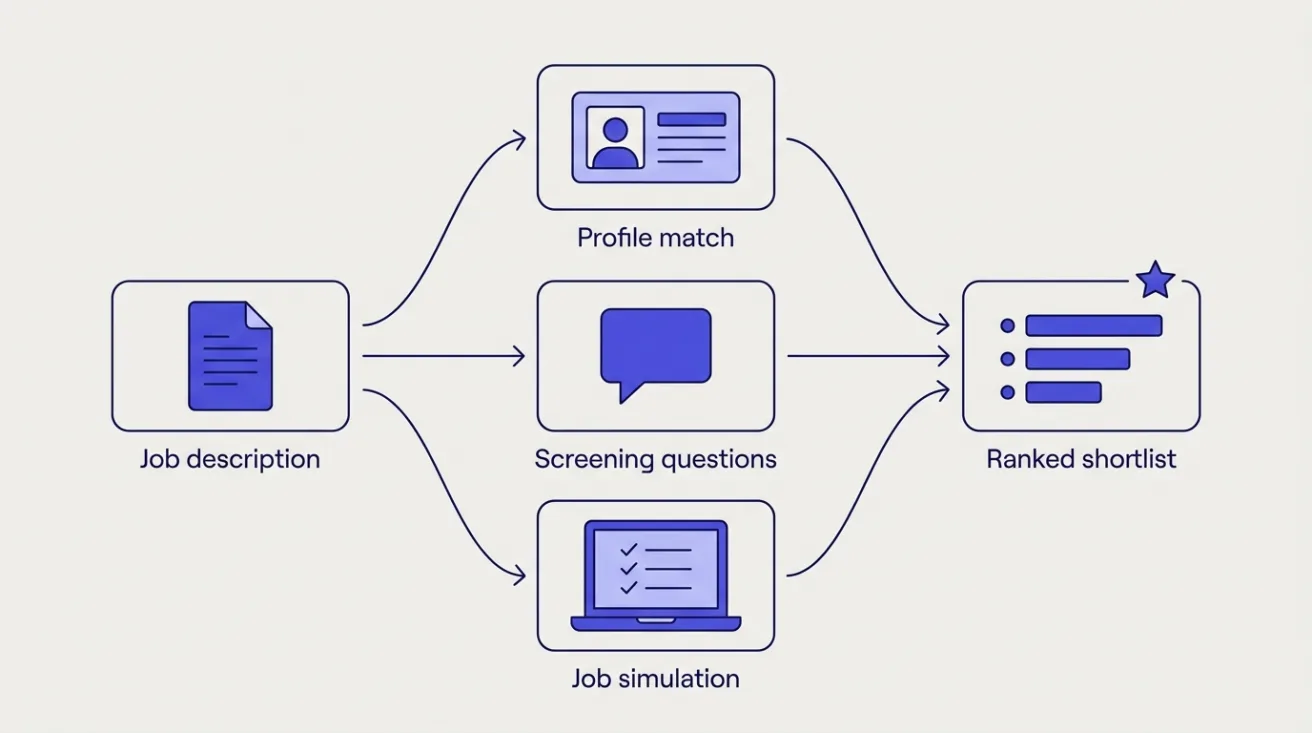
The newest category takes a job description and returns candidates who are interested and have been evaluated in some way. The large sourcing vendors are moving here with AI agents. Cohesyve, which publishes this guide, sits here too: a company gives it a job description, and it sources candidates, runs outreach, puts the people who respond through job simulations of the real work, and returns a ranked shortlist, so interview time goes on the strongest applicants.
The question to ask any service in this category is what "screened" means. Ranking profiles by keyword fit is a different thing from evaluating what candidates can do. Ask to see exactly what evidence sits behind each name on the shortlist.
Cohesyve
Hiring for a role right now?
Cohesyve takes a job description, finds candidates, reaches out to them and runs an AI job simulation of the real work, then returns a ranked shortlist. Ten candidates free, no card.
Is there an AI tool that sources and screens candidates from a job description?
Yes. Several products now take a job description and return a ranked shortlist: sourcing platforms with AI agents match profiles and screen applicants against your criteria, and services such as Cohesyve put the candidates who respond through a job simulation of the real work before ranking them. The difference is the evidence behind each name: a profile match, answers to screening questions, or how the person handled a task from the job. SeekOut, hireEZ and LinkedIn's Hiring Assistant each describe AI screening of applicants, with AI video interviews, voice screening conversations and prescreening questions respectively.
What to automate first
Start with the steps that are repetitive, high-volume and low-risk, and keep judgement with people.
- Rediscovering past applicants. Your ATS already holds people who applied, interviewed well and were narrowly beaten. Searching it automatically is the cheapest source of qualified candidates you have.
- Search building. Turning a job description into a search across sources saves time and is easy to check.
- First-draft messages. Let the tool draft; have a recruiter approve, at least for the first weeks of any new role.
- Follow-ups. Sending them on time, every time, is exactly what software is good at and what busy recruiters rarely manage by hand.
- Scheduling. Once someone replies with interest, let them book a call themselves.
- Evaluation of respondents. Inviting interested candidates to a short job simulation replaces a round of screening calls.
Be slower to automate decisions about who to reject. Tools that use AI or automated scoring to rank or filter candidates can fall under AI hiring rules in several jurisdictions (see our guide to AI hiring laws), and a person should review rejections.
Deliverability basics
Automated outreach is useless if it lands in spam, and the mailbox providers tightened their rules in 2024.
- Authenticate your domain. Google's sender guidelines, in force since 1 February 2024, require every sender to Gmail accounts to set up SPF or DKIM. Senders of more than 5,000 messages a day to Gmail also need SPF, DKIM and DMARC.
- Watch the spam rate. Google asks senders to keep the spam rate reported in its Postmaster Tools below 0.3%, and recommends staying under 0.1%.
- Make leaving easy. Bulk senders need one-click unsubscribe for marketing and subscribed messages. For recruiting outreach, a clear "not interested, don't contact me again" link is good practice whatever your volume, and it is far better than being marked as spam.
- Keep volume human. Ramp up new sending domains gradually, spread sends across the day and stop sequences as soon as someone replies.
- Write to one person. Generic messages get ignored and reported. Mention something specific about the person's work and the role.
Consent and data basics
This is a summary, not legal advice.
- EU and UK (GDPR). Article 14 applies when you collect someone's data from somewhere other than them, which is what sourcing is. You must tell them, among other things, where their data came from and whether it was a public source. That information is due within a reasonable period and at the latest one month after you obtain the data. If you contact them before then, it is due at the latest in your first message. Have a short privacy notice and link it from every first message.
- United States (CAN-SPAM). The law covers commercial email and makes no exception for business-to-business messages. Whether a recruiting message counts as commercial depends on its content, so the simple course is to follow the basics anyway: an honest subject line, a working opt-out honoured within 10 business days, and a valid postal address.
- Retention. Decide how long you keep data on people who never replied, and delete it when that period ends.
- Suppression. Keep one list of people who asked not to be contacted, shared across every tool and recruiter.
Metrics to track
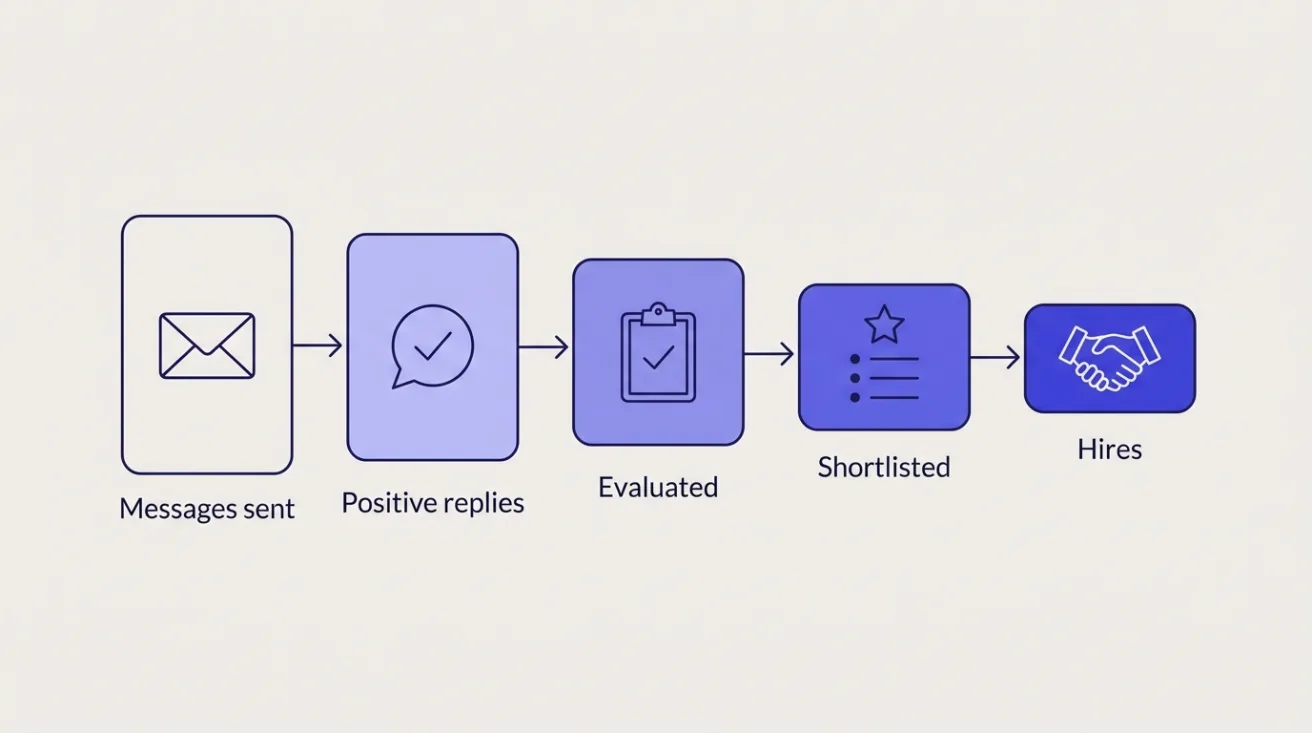
Track the funnel. Messages sent is a cost; the outcomes are further down.
| Metric | What it tells you |
|---|---|
| Positive reply rate | Whether targeting and messaging are working |
| Interested to evaluated | Whether candidates follow through once they reply |
| Evaluated to shortlisted | Whether sourcing is finding people who can do the work |
| Hiring-manager acceptance of the shortlist | Whether the shortlist matches what the manager wants |
| Time from job description to shortlist | The speed gain you are paying for |
| Hires from sourced candidates | The outcome, over a quarter or more |
| Unsubscribe and spam-complaint rate | Whether you are damaging your domain and employer brand |
Compare each against your own baseline from before the tool, rather than against a vendor's average.
Questions to ask vendors
- Which profile sources do you search, and how is contact data obtained?
- Can you search our ATS for past applicants?
- Who approves messages before they are sent, and can we require approval?
- Which channels do sequences use, and how do you protect our sending domain?
- How do you handle opt-outs and suppression across users?
- How do you support GDPR Article 14 notices for sourced candidates?
- What does "screened" or "ranked" mean in your product, and what evidence sits behind a rank?
- Do you have a bias audit for any ranking or screening feature?
- How does data flow back to our ATS?
- What is the total twelve-month cost at our hiring volume? (For competitors' prices, check their sites; Cohesyve's plans are subscriptions sized to annual hiring volume, from $199 a month.)
Common questions
Is sourcing automation worth it for high-volume hiring? Usually less than for specialist roles. High-volume roles often have more applicants than the team can evaluate; the bottleneck is evaluation. See our high-volume recruiting strategies.
Will automated outreach hurt our employer brand? Badly targeted, high-volume outreach will. Narrow searches, specific messages, quick opt-outs and stopping on reply keep it closer to what a good recruiter would send.
How does this differ from recruitment automation generally? Sourcing and outreach are one slice of it. Our overviews of recruitment automation tools and AI recruitment tools cover scheduling, screening and assessment as well.
What does a shortlist need to contain to be useful? Enough evidence for a hiring manager to decide who to interview without rereading every profile. Our explainer on shortlisting covers what to include.